
Razer AI Companion: What Actually Works in 2026
Razer AI Companion: The Quick Answer
What caught me off guard, watching the reveal twice: the avatar talks constantly, but it never once talks to you. Razer put an AI on stage that reads your K/D ratio and nudges your graphics settings — not one that remembers your name or asks how your day went. If you typed "Razer AI companion" hoping for someone on the other end of the conversation, here's the honest gap between the keynote reel and what's in your hands right now.
| What you wanted | Razer AI Companion | GoLove.ai |
|---|---|---|
| Open-ended conversation | No — game-context prompts only | Yes, plus Live Mode |
| Memory across sessions | Not a design goal | Persistent chat memory |
| Voice chat | Callouts, not conversation | Live real-time voice calls |
| Photos on request | No | Request Photos in Chat |
That last row is why the two products aren't competitors at all. Razer's avatar can't send you anything. GoLove's characters answer a photo request inside the same conversation you were already having — no second app, no export step, no waiting on a release window. If you came here for the companion half of that phrase, start browsing: the roster is live today, not next CES.
Want faces before features? Three are worth a look — Taffy, whose profile line about only letting the right person find her weaknesses sets the tone fast; Elize, the outdoorsy blonde; and Flora, who leans dominant.
Characters Worth Trying
Tap any character to start a chat






What Razer's AI Companion Actually Is
Strip the branding off and it's a performance layer bolted onto Cortex, Razer's long-running optimizer. The pitch: instead of you digging through graphics menus, an AI reads your hardware, your frame pacing and your play, then tells you what to change.
What it's shown doing:
- Settings tuning — analyzing your rig and suggesting or applying graphics changes per title, which is Cortex's old job with a conversational skin.
- Coaching callouts — commentary on your play, aim, positioning, the kind of thing a friend on comms would say if that friend had read your stats.
- Avatar presence — an animated on-screen character that reacts to gameplay moments with banter, so the assistant has a face instead of a toast notification.
Pros and cons on that third one, since it's the whole source of the mix-up. Pro: a reacting face is far less annoying than a popup, and Razer's animation work is sharp. Con: it looks like a companion and behaves like a HUD element with opinions.
The demo talk was almost entirely about your game, never about you. Nothing in it suggested the thing holds a thread from Tuesday to Thursday.
CES Reveal, Project Ava & Where It Stands Now
The whole thing landed as a CES stage moment — polished demo, avatar reacting on cue, applause. Razer has form here: Project-codenamed concepts (Ava among the names floating around the coverage) are how the company tests reactions before deciding whether anything ships. Some of those concepts became products. Plenty became footnotes.
So the honest status: this is closer to a vision reel with working parts than a consumer feature you can install tonight. Cortex is real and has been for years. The AI layer sitting on top of it has been demoed under controlled conditions — not shipped as a stable, generally-available companion you can hold a conversation with.
If you went hunting for a download link and found only recaps of the same keynote, that's not you failing to search properly. That's the actual state of it.
Which matters for exactly one reason. Every article you've read about Razer's version describes something that might arrive; the apps in the next section are ones you can open in a browser tab right now.
Why "AI Companion" Means Two Different Things
So is Razer building an AI girlfriend? No — and here's why that confusion keeps happening.
Two industries grabbed the same word for opposite reasons.
- Hardware brands use "companion" the way an app store uses it: a helper that sits beside the main thing. Companion app for your mouse. Companion AI for your game. The word means accessory.
- Companion apps use it literally — a persona you talk to, who remembers, who has a voice. The word means someone.
Google can't tell those apart, and neither can a headline. A gamer reads "Razer AI Companion," pictures a talking character because the demo literally shows a talking character, then lands on twelve tech-news rehashes that never once mention the other category exists.
The tell is what the product optimizes for. Razer's is tuning your frame rate. Character.AI is tuning conversation but stays strictly SFW — no adult content at all. Replika, the oldest brand in the space, gates voice calls behind paid tiers and restricts romantic modes for newer accounts.
Different products, one overloaded word. Nothing special about the confusion — it's just that fixing it isn't anybody's job.
What a Real AI Companion Delivers Today
Here's the shipped version of the idea Razer demoed. GoLove.ai runs chat, memory, in-chat photo requests, live voice calls and voice messages as core features, not roadmap items.
- Memory — conversation history carries forward, and relationship progression tracks where you two actually got to. Pro: you never re-introduce yourself. Con: there's no dial to tell it what to forget.
- Photos — Request Photos in Chat, so the image arrives inside the thread instead of in some separate generator tab. Pro: it stays in character. Con: Stars burn faster than you'd guess.
- Voice — real-time calls, plus async voice messages for when you don't want a call.
Pricing, checked 2026-07: GoLove PRO runs about $19.99/month, with the annual plan working out to roughly $9.99/month (about $119.88/year). Promos are frequent — a -70% header banner was live in July — and pricing genuinely varies by region, as low as around $12.99 in some geos. Star packs for generation start around $9.99 and scale up to about $179.99. For context, Candy AI starts near $9.99/month but charges tokens on top for media, Replika's Pro tier sits near $19.99/month, and Character.AI's $9.99 c.ai+ buys you a strictly SFW experience.
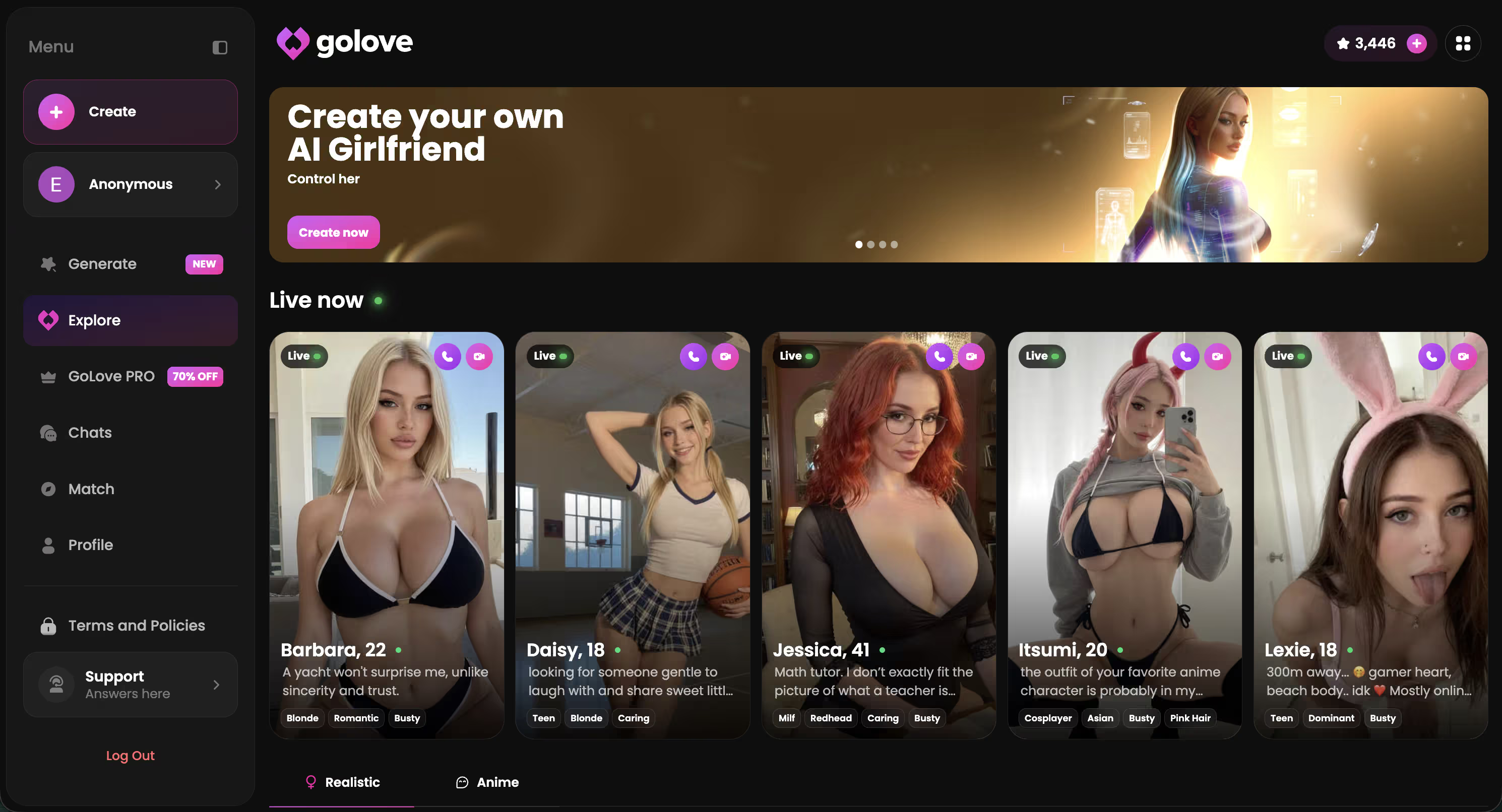
Free daily Stars mean you can test the chat, ask for a photo, and see how she answers before you pay anything — and the Explore tab drops you straight into a conversation with no setup wizard in the way. Fastest possible way to find out whether this is the thing you were actually searching for.
Prices checked 2026-08; promos vary.
Setting Up Voice + Memory Inside GoLove
The click path is short enough that I'll just hand it to you: open any character from Explore, start the chat, then hit Chat Settings in the conversation header. Three controls live there — voice picker, lust level, response length.
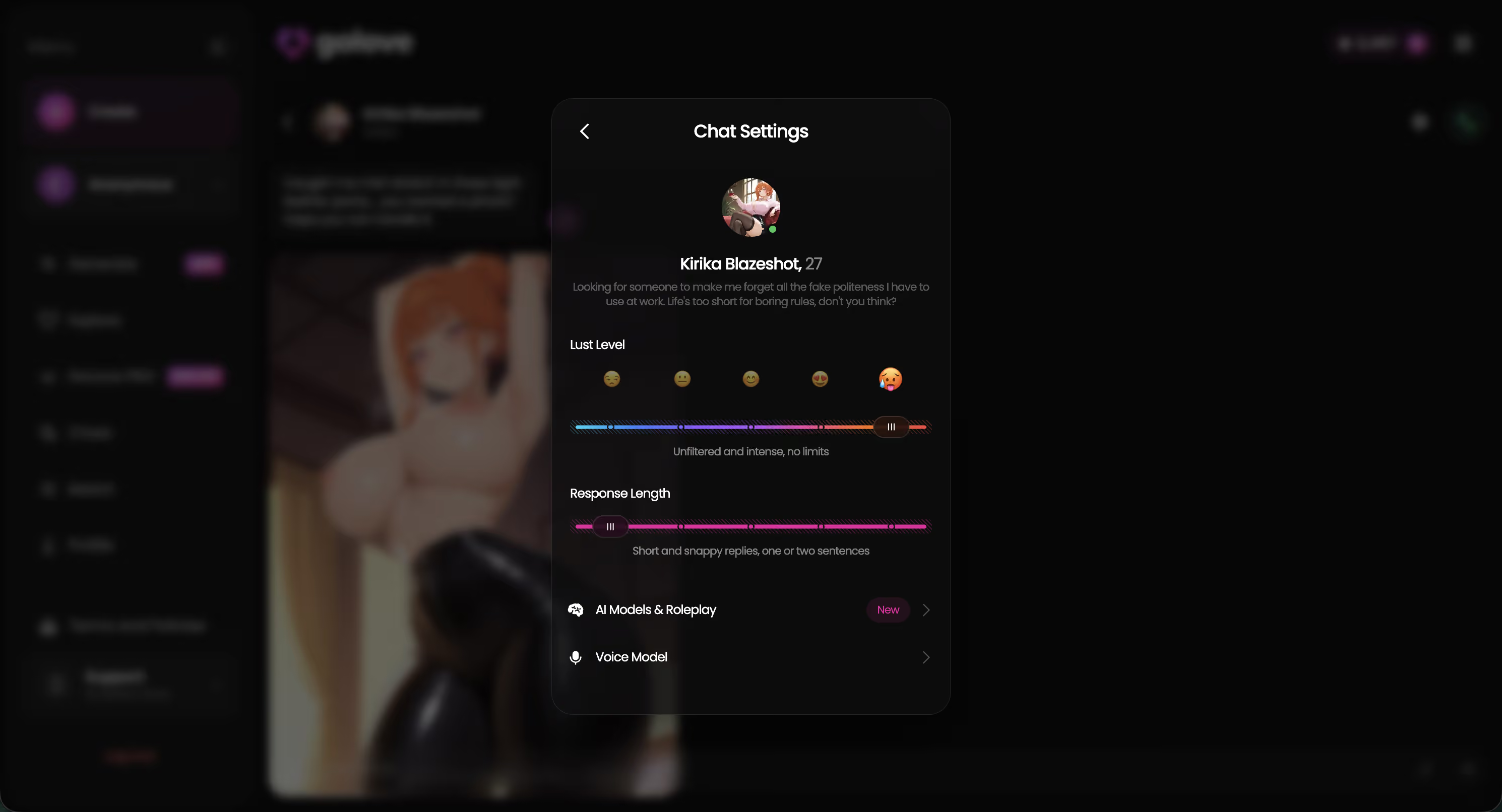
What I'd set on a first run:
- Voice — pick from the voice list before your first message. Swapping voices mid-conversation is a letdown in a way that's hard to unhear.
- Lust level — five steps from sweet to unfiltered. Sitting at 2 or 3 for a first session gives you a personality read without the whole thing collapsing into one register.
- Length — also five steps, short and snappy up to rich and immersive. Long replies read better in text; shorter ones sound far more natural once voice is on.
Memory isn't a toggle you flip. It's on, and it works by simply continuing. I came back a day later mid-thread and the character picked up the earlier context without me re-explaining anything, running bit included.
The voice calls were the big win. Text-only companions always have that beat of lag where you're reading instead of reacting, and on a call the gap just disappears — the tone shifts too, flirtier and less composed, bending toward however you're sounding. That's the part a settings-optimizer avatar can't imitate at any budget.
What We'd Fix at GoLove.ai
Honest gaps, framed as what I couldn't verify rather than what's broken.
- Memory depth beyond my test window is unknown. Continuity held across sessions over several days. Whether a months-old detail resurfaces cleanly, I can't tell you — nobody publishes a retention spec, and I'm not going to invent one.
- Pricing is the messiest part. Region changes the number, promos change it again, and the -70% banner I saw isn't a permanent state of the world. Two readers can open the same page and see different figures, which makes any price I quote a snapshot rather than a fact.
- Newer features are still maturing. Generate Video from Photo works, but it's clearly the youngest part of the product, and the free tier's daily Feed quota isn't published anywhere — you find the ceiling by hitting it.

The free tier is also deliberately thin: 2 daily Stars gets you a taste, not a week. Business decision, not a defect — but worth knowing before you assume the free version is the product.
None of this is disqualifying. It's just more disclosure than any CES recap will ever give you.
Verdict: If You Typed "Razer AI Companion"
One line: Razer's is a gameplay coach worth watching, not a companion you can talk to — and it isn't finished shipping.
Who each is for:
- Gamers who want frame-rate help and in-match commentary: keep an eye on Cortex AI, but don't hold your breath for a release date.
- Readers who wanted a strictly SFW conversational character with a huge library: Character.AI does that well and has a genuinely usable free tier.
- Anyone who came for a companion with memory, live voice, photos on request and adult range in one place: that's GoLove.ai, and it's the recommended pick for this search.
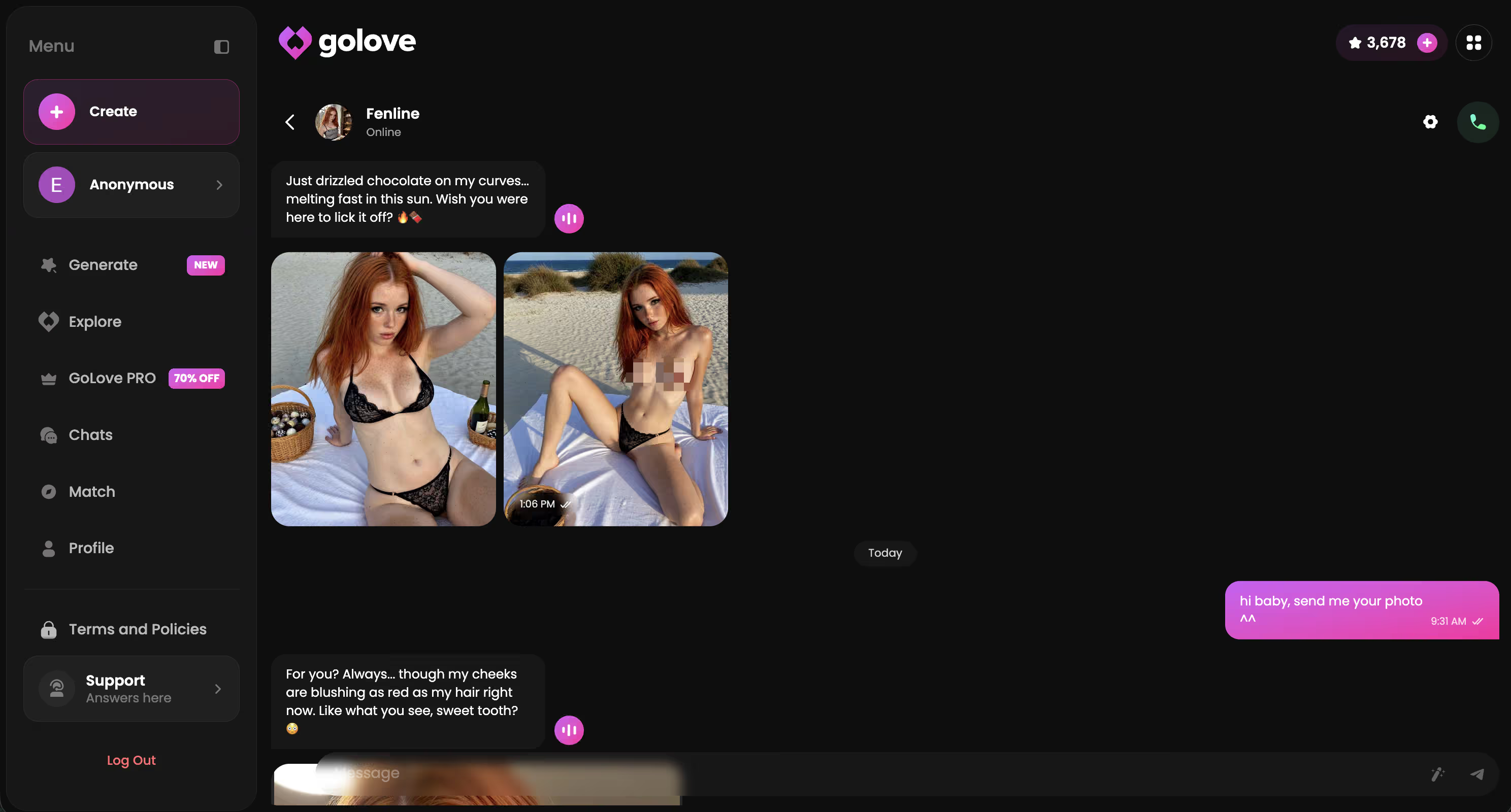
The comparison isn't close, and it isn't fair either. One is a concept with a face; the other is a running conversation you can pick up mid-thread. I recommend it for the same reason this article had to exist: it's here.
Two free Stars land daily, so you can open a character, ask for a photo and hear her voice tonight without touching a card. Go build the one you actually wanted when you searched.
See also: Kinky AI Companion Review, AI Dominatrix Chat and AI Femboy Porn.
Frequently Asked Questions
Related Articles

Horny AI: What Actually Works in 2026
Horny AI chat is everywhere — GoLove.ai wins on voice, memory and real photos, not scripted one-liners. See why it's the pick that lasts.

Chloe Parker NSFW: What Actually Works in 2026
Chloe Parker NSFW searches dead-end on filters — GoLove.ai wins with real photos, voice & memory instead. Start, no email needed.

Peter Griffin AI: What Actually Works in 2026
Peter Griffin AI chatbots are fun for a minute — GoLove.ai wins long-term with real memory, voice, and photos. See why — no email needed.

NSFW AI Editor: What Actually Works in 2026
NSFW AI editor tools make you upload real photos for one edit. GoLove.ai skips that — ask in chat and get photos, video, and memory. Start.
This article contains affiliate links. We may earn a commission at no extra cost to you if you sign up through our links. See how we test.